
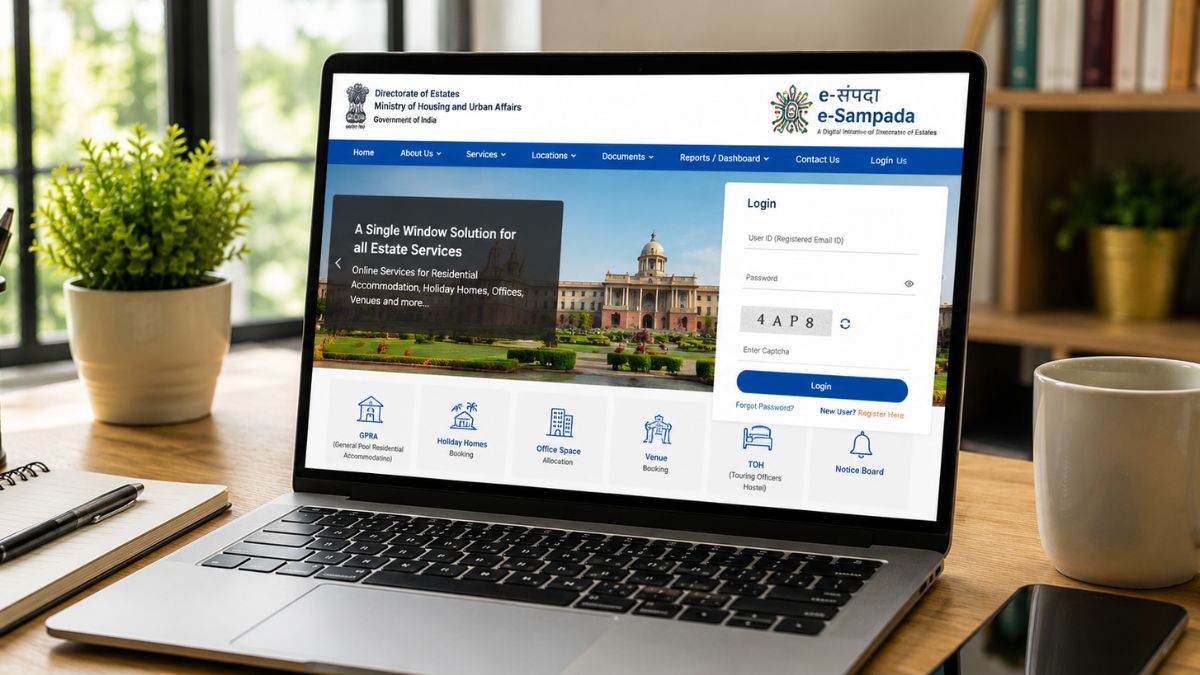
The Government of India manages residential and estate services for its employees through a single digital gateway. This gateway is called e Sampada. It replaced multiple older systems and paper-based processes. Today, lakhs of central government employees use this portal. They access housing allotments, holiday home bookings, and venue reservations through it. This guide explains everything about e Sampada in detail. It covers registration, login, GPRA allotment, and holiday home booking. You will also learn about the e Sampada app and helpline support.
What Is E Sampada
E Sampada is a unified online platform for the Directorate of Estates. The Ministry of Housing and Urban Affairs operates this directorate. The portal launched on December 25, 2020, as part of the Digital India mission. It consolidates all estate-related services into one digital window. Before e Sampada, employees used separate portals for different services. This created confusion and delays for applicants. E Sampada merged these scattered systems into a single platform. It now covers over 40 locations across India.
The portal handles government residential accommodation allotment for eligible officers. It also manages holiday homes, touring officers hostels, and office space booking. Additionally, it oversees venue booking for iconic properties. These include Vigyan Bhawan, 5 Ashoka Road, and Kidwai Nagar Lawns. The platform aims for transparency, speed, and paperless governance. Every process runs through automated online applications and approvals.
Understanding The E Sampada Portal
The e Sampada portal serves as the digital front door for estate services. Users can access it directly at esampada.mohua.gov.in. The homepage displays login options and quick links to key services. Applicants can check waiting lists, bidding schedules, and allotment status here. The portal also displays important notices and deadlines for applicants.
The e Sampada portal supports several major functions for different user groups. Central government employees can apply for General Pool Residential Accommodation. Retired employees can book holiday homes and touring officer hostels. Departments can request office space allocation through the same system. Citizens and organizations can also book banquet halls and conference venues. Vigyan Bhawan, built in 1956, remains a major venue booked through this portal.
The interface organizes services under clear categories on the dashboard. Applicants select the service they need after logging in. The system then guides them through the relevant application form. This structured approach reduces confusion for first-time users. However, some users report navigation issues with office selection dropdowns. The Directorate of Estates continues updating the platform to fix such glitches.
Who Can Use The Portal
The e Sampada portal serves a wide range of government-linked users. Serving central government employees form the largest user group on the platform. Retired central government employees can also register and use most services. Employees of state governments and union territories qualify for certain services too. Central and state public sector undertaking employees can access holiday homes as well. Statutory and autonomous body employees also fall under eligible categories.
Each user category faces different eligibility rules for specific services. GPRA allotment eligibility depends heavily on pay level and employee category. Holiday home booking eligibility often depends on employment status and booking history. The portal checks these details automatically during the application process. Applicants should verify their eligibility before starting any application.
E Sampada Registration Process
Every new user must complete e Sampada registration before accessing services. Registration takes only a few minutes with the right documents ready. Follow these steps to complete e Sampada registration online successfully.
First, visit the official website at esampada.mohua.gov.in/signin. Look for the login button placed at the top right corner. Clicking this button opens a pop-up box for existing or new users. New applicants should look for the registration link inside this pop-up. It usually reads something like “Don’t have an account? Register Here.”
Clicking this link opens the actual registration form. The form asks for essential personal and professional details. Applicants must enter their full name and date of birth accurately. They also need to select their employee category from a dropdown list. The form requests the city where the applicant is currently posted. Some versions of the form also ask for PAN details.
Next, applicants must provide a valid email address and mobile number. The system sends a One-Time Password to verify both details. Users must enter this OTP correctly to proceed further. After OTP verification, the form asks for employment dates. Applicants enter their date of joining and expected date of retirement. This information helps the system calculate eligibility for various services.
Finally, applicants must enter a captcha code to confirm they are human users. After completing all fields, users click submit to finish registration. The account then becomes active for login and profile completion. New users usually get redirected automatically after successful registration. A pop-up box may appear asking them to complete their profile immediately.
Completing Your Profile After Registration
Registration alone does not grant full access to all services. Applicants must complete their profile before using most portal features. After the first login, users should click on “My Profile.” This section requires additional details about designation and department. Applicants also need to upload service-related documents in some cases. Retired employees may face additional profile fields compared to serving employees.
Profile completion is mandatory for bidding on GPRA quarters. The portal instructions specify that applicants must update their profile yearly. Failing to update it can affect eligibility for allotment bidding. Admins at the respective department must also approve the updated profile. Only after this approval can an applicant participate fully in allotment cycles.
How To Complete E Sampada Login
Once registered, e Sampada login becomes simple and quick for users. The portal does not require users to remember complex passwords. Instead, it relies on OTP-based authentication for most logins. This design choice reduces password-related login problems significantly.
To log in, visit the official portal and click the login button. Users can also log in by scanning a QR code shown on screen. Enter the registered mobile number or email address in the login box. The system then sends an OTP to the registered contact detail. Enter this OTP correctly to access your dashboard immediately.
Some users report OTP generation issues on certain browsers or networks. If this happens, try refreshing the page or switching browsers. Users can also try the e Sampada app for a smoother experience. Always ensure your registered mobile number stays active for uninterrupted access. If you change your number, update it through official department channels promptly.
Read More: ULB Haryana: Complete Guide to Property Tax, NDC, Login and Online Services in 2026
GPRA In E Sampada Explained
GPRA stands for General Pool Residential Accommodation. This scheme provides affordable housing to eligible central government employees. The scheme currently covers 63 cities and 353 localities across India. The Central Public Works Department and Directorate of Estates jointly administer GPRA. They follow the Central Government General Pool Residential Accommodation Rules, 2017.
GPRA in e Sampada replaced the earlier system that used separate portals. Previously, employees used a portal called e-Awas for GPRA applications. This older system has now been merged into the e Sampada platform. The change created a single-window experience for housing allotment. Employees moving to a new city can apply for a GPRA quarter here. Those expecting promotions can also apply through the same process.
To apply for GPRA in e Sampada, follow this simple sequence:
- Log in to your account using your registered credentials.
- Select the government residential accommodation option from the dashboard.
- Scroll down and complete the DE-II form with accurate details.
- Submit the form and wait for verification by the respective administrative body.
After submission, your application moves into a waiting list for allotment. The waiting list operates based on seniority and eligibility criteria. Applicants should check their name on the waiting list every month. This must happen before the first day of each bidding cycle. Bidding periods typically run during the first ten days of each month.
Once selected, applicants receive an allotment letter at their registered email. They must accept the house and collect the authority slip promptly. This must happen by the 18th of the allotment month. Missing this deadline pushes the allotment to the next month’s vacancy list. Applicants must also take technical possession by the 26th of the month. Delayed possession similarly gets carried forward to the next cycle.
The GPRA process through e Sampada aims for full transparency. It removes human discretion from most allotment decisions. Automated systems match applicants to available quarters based on eligibility. This reduces complaints of favoritism seen in older manual systems.
E Sampada Holiday Homes Overview
E Sampada Holiday Homes offer affordable accommodation for government employees during travel. The Directorate of Estates administers these facilities across popular destinations. Central Public Works Department maintains the physical infrastructure of these properties. Holiday homes exist in hill stations, coastal towns, and major cities nationwide.
These properties come with different room categories to suit various needs. Some locations offer basic rooms, while others provide suite-style accommodation. Touring Officers Hostels serve a similar purpose for officials on official duty. Both facility types operate under similar booking rules and procedures.
Serving and retired central government employees can book these holiday homes. State government employees and public sector undertaking staff also qualify. Eligibility rules vary slightly depending on employment category and service history. Applicants should check specific eligibility criteria before attempting a booking.
E Sampada Booking Process
E Sampada booking for holiday homes follows a first-come, first-serve system. This means earlier applications generally get priority for available rooms. However, booking still depends on eligibility and payment of applicable charges. Understanding the booking process helps applicants avoid common mistakes and delays.
- To start an e Sampada booking, log in to your verified account.
- Navigate to the accommodation or venue booking section on the dashboard.
- Choose your desired location from the list of available holiday homes.
- Select your preferred dates for check-in and check-out.
- The system displays room availability for the chosen dates immediately.
After selecting a room, applicants must complete the online payment process. Payment confirms the booking and generates a unique booking ID number. This ID appears on the confirmation screen and registered email. Applicants should save this ID for future reference and check-in purposes. Always carry a printed or digital copy during your actual stay.
Some users have reported difficulty finding available rooms during peak seasons. Popular hill station locations often get booked quickly in summer months. Planning your travel dates early improves your chances of securing a room. Booking well in advance remains the best strategy for busy periods.
Beyond holiday homes, the same booking system covers venue reservations too. Applicants can book Vigyan Bhawan halls for conferences and seminars. The venue gets allotted based on priority rules and licence fee payment. Similarly, 5 Ashoka Road bungalow serves marriage and social functions. This bungalow gets allotted for a maximum period of five days. Applicants pay a licence fee based on official policy guidelines.
Kidwai Nagar East Lawns and Fagli Club in Shimla also fall under this system. These venues follow similar booking and payment procedures. Always check the specific rules for each venue before applying.
E Sampada App For Mobile Access
The e Sampada app extends portal access to smartphones and tablets. Users can download this app from the Google Play Store easily. The app mirrors most functions available on the desktop website. This includes registration, login, booking, and profile management features.
Using the e Sampada app offers convenience for employees who travel frequently. They can check booking status and availability while away from a computer. The app also sends notifications about application updates and deadlines. This helps applicants stay informed about important dates and actions.
To use the app, download it from the official Play Store listing.
- Register or log in using the same credentials as the website.
- The OTP-based login system works identically within the mobile application.
- Users should ensure they download only the official app to avoid fraud.
- Checking the developer name and reviews helps confirm the app’s authenticity.
Some users have reported minor bugs on certain app versions. The Directorate of Estates periodically pushes updates to fix such issues. Keeping the app updated ensures access to the latest features and fixes.
E Sampada Helpline Number And Support
Technical issues sometimes arise while using any large government portal. The e Sampada helpline number and support channels exist to address these problems. Applicants facing login issues, payment failures, or form errors can seek help. The portal includes a dedicated complaint redressal mechanism for this purpose.
Users can access this support system through the “Reach Out” section online. This section allows applicants to submit their contact details and issue description. The support team, referred to as GYAN, reviews submitted complaints. GYAN stands for Get Your Assistance Now within the portal’s support framework.
For holiday home bookings specifically, individual properties often maintain local phone numbers. However, some users report these numbers go unanswered during busy periods. In such cases, using the official online complaint system works better. Always keep a record of your complaint reference number for follow-up.
If you face registration or login problems, try the following steps first. Clear your browser cache and attempt login again. Switch to the official e Sampada app if the website causes issues. Ensure your registered mobile number remains active and correctly linked. If problems persist, submit a formal complaint through the portal’s support page.
E Sampada Grievance Redressal System
E Sampada includes a structured grievance redressal system for applicants facing unresolved issues. This system works alongside the regular GYAN support channel. It handles complaints that need escalation beyond basic troubleshooting. The Directorate of Estates monitors this system closely to maintain service standards.
Applicants can raise a grievance directly through their e Sampada dashboard. The portal provides a dedicated section for lodging formal complaints. Users must select the relevant category before submitting their issue. Categories usually include allotment disputes, payment errors, and profile mismatches.
Each grievance receives a unique tracking number after submission. This number allows applicants to monitor the status of their complaint. The system typically assigns a resolution timeline based on complaint type. Simple technical issues often resolve faster than allotment-related disputes.
Officials review each grievance before forwarding it to the concerned department. This ensures the right team handles each specific problem. Applicants receive updates through their registered email and mobile number. The e Sampada portal keeps a complete record of past grievances for reference.
Escalation options exist for complaints that remain unresolved beyond the standard timeline. Applicants can approach senior officials within the Directorate of Estates. This structured escalation path prevents complaints from getting lost in the system. It also holds departments accountable for timely resolution.
Users should provide clear details while filing any grievance on e Sampada. Vague descriptions often delay the resolution process significantly. Attaching screenshots or reference numbers helps officials understand the issue faster. This small step often speeds up the entire redressal process.
E Sampada Payment And Refund Process
E Sampada uses an integrated online payment gateway for all bookings. This applies to holiday homes, venue reservations, and certain accommodation charges. Applicants complete payments directly within the portal after selecting their service. The system generates a digital receipt immediately after successful payment.
Multiple payment methods remain available for e Sampada transactions. Users can pay through debit cards, credit cards, and net banking. UPI-based payments have also become a popular option among applicants. This flexibility makes the booking process convenient for most users.
Refunds on e Sampada follow specific rules based on cancellation timing. Applicants who cancel bookings well in advance often receive fuller refunds. Last-minute cancellations may attract deduction charges as per portal policy. Users should review the cancellation policy before confirming any booking.
The refund process itself runs through the same digital payment gateway. Approved refunds typically reflect in the applicant’s account within a few working days. Delays sometimes occur due to bank processing timelines rather than portal errors. Applicants can track refund status through their e Sampada dashboard.
Payment failures during booking attempts do occasionally happen on e Sampada. In such cases, the amount usually reverses automatically within a short period. Applicants should avoid repeated payment attempts during technical glitches. Instead, they should wait and check their booking status before retrying.
Keeping transaction records helps resolve any payment-related disputes quickly. Applicants should save payment confirmation emails for future reference. This practice supports faster resolution if refund issues arise later.
Common Issues Users Face On E Sampada
Despite improvements, some users still report difficulties with the platform.
OTP generation sometimes fails during registration or login attempts. Office details do not always appear correctly under certain ministries. Employees from departments without a dedicated ministry face particular challenges here. For example, some Department of Atomic Energy employees report this issue.
Retired employees sometimes find the profile form asks for excessive details. This can make the registration process feel longer than necessary. Additionally, some users find the standard operating procedure unclear or hard to locate. The Directorate of Estates continues receiving feedback about these usability concerns.
Despite these challenges, e Sampada remains far more efficient than older paper-based systems. Most applicants successfully complete registration and booking without major problems. Patience and accurate data entry help avoid many common errors.
Tips For Smooth E Sampada Usage
Here are some expert tips for you if you want to use E Sampada easily.
- Keep your registered mobile number and email address updated at all times. This ensures you receive OTPs and important notifications without delay.
- Complete your profile fully right after registration to avoid access issues. Update your profile annually to maintain eligibility for GPRA bidding cycles.
- Check the waiting list status regularly if you have applied for GPRA. Missing acceptance or possession deadlines can delay your allotment significantly.
- For holiday home bookings, plan your travel dates well in advance. Popular destinations fill up quickly during holiday seasons and long weekends.
- Use the official app for on-the-go access to your account. Always download applications only from verified app store listings.
- Save your booking IDs and allotment letters for future reference. Keep digital and printed copies handy during travel or accommodation checks.
- If you encounter technical problems, document the issue with screenshots. Submit complaints through the official portal rather than unofficial channels. This creates a proper record and speeds up resolution timelines.
The Future Of E Sampada
The government continues expanding the scope of e Sampada services. More cities and properties get added to the platform regularly. Digital integration across departments continues improving through 2026. The goal remains a fully paperless and transparent estate management system.
As more employees become familiar with the platform, complaint volumes should decrease. Continuous updates aim to fix navigation and verification issues reported by users. E Sampada represents a significant step in India’s digital governance journey. It reflects the broader Digital India initiative launched to modernize public services.
Conclusion
E Sampada has transformed how central government employees access housing and estate services. From e Sampada registration to GPRA allotment, the process runs mostly online. E Sampada Holiday Homes and venue bookings offer added convenience for eligible users. The e Sampada app extends this convenience to mobile devices. While some technical issues remain, the portal marks a major improvement over older systems. Understanding the registration, login, and booking process helps you use e Sampada effectively. Keep your profile updated and monitor deadlines closely for the best experience.
Frequently Asked Questions
What is e Sampada used for?
E Sampada is a government portal managing residential accommodation, holiday homes, office space, and venue bookings for central government employees and eligible citizens.
How do I complete e Sampada registration online?
Visit esampada.mohua.gov.in, click login, select register, enter personal and employment details, verify through OTP, and submit the form to complete registration.
What is GPRA in e Sampada?
GPRA means General Pool Residential Accommodation, a scheme offering affordable housing to eligible central government employees across 63 cities through the e Sampada portal.
How can I book e Sampada Holiday Homes?
Log in to your account, select accommodation booking, choose your location and dates, check availability, complete payment, and receive your confirmed booking ID.